Annual
R$12.42/month
R$149 billed once a year
12 × R$19.90 = R$238.80 Save R$89.80 per year
Every result comes explained: what it means, whether it is within range and what to set in the device.
Also free, no sign-up: whole-house cables and breakers based on NBR 5410
Yearly plan: R$149 per year (R$12.42 per month), 37% cheaper than monthly.
See it working
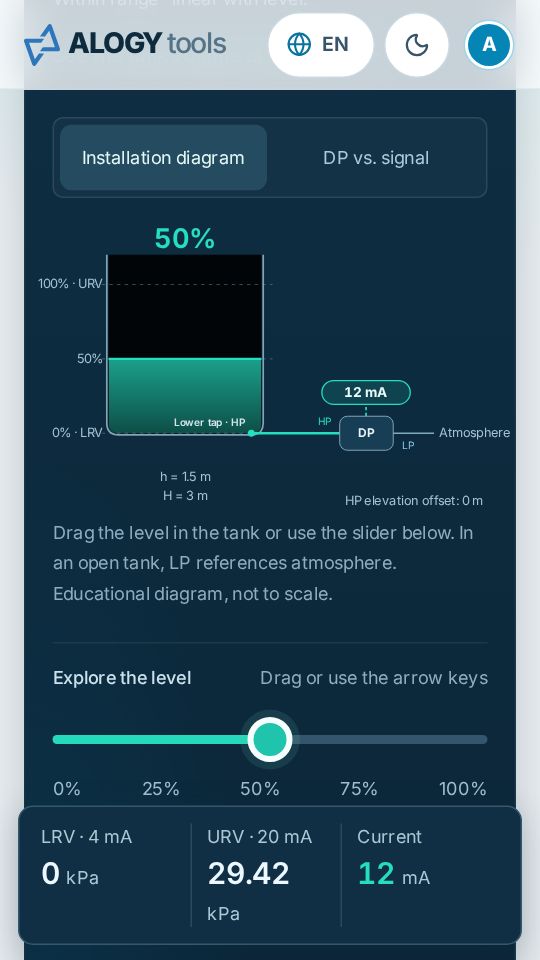
Open tank example: 3 m of water with the LP tap open to atmosphere. DP and the 4–20 mA signal change instantly.
With a subscription
Drag the level in the tank or use the slider below. In an open tank, LP references atmosphere. Heights to the tank scale; the rest of the drawing is illustrative.
App
Install the app on the home screen of your phone or computer. It opens full screen and, after you download the tools in the dashboard, works with no signal in the field.
Same tools in both plans. Choose how you prefer to pay.
Tools
What does this current mean in the process?
Which Kp, Ti and Td should go into the PLC?
Which LRV and URV should go into the DP transmitter?
How many ohms should I read at this temperature?
How many mV match this temperature?
How do I record this sensor calibration?
How do I take the pressure points to the field?
How do I document buffers and readings?
How do I compare the meter with the reference?
How do I organise the weighing instrument tests?
Mechanics, fluids, gases, electrical and conversions, to the same standard: formula in view, PDF and work saved on your device or in your account.
Which cable, breaker and RCD for each circuit of the house?
What is this pressure in another unit?
How many Nm³/h flow at these operating conditions?
How many mg/m³ are these ppm?
How much product is in the tank at this level?
What pipe diameter suits this flow?
How much pressure does the line use up?
Which cable and breaker does this load need?
What speed comes out of this pulley?
What motor does this fan need?
At what frequency does the bearing fault show up?
4–20 mA
Calibration sheets
It is a data sheet: the calibration certificate is still the laboratory’s.
See the pressure sheetWhy ALOGY Tools
An AI chat helps you understand a concept. When you have to deliver the number, you need the right table from the standard, the criteria checked together and a document to file: that is what each tool does, the same way every time.
Within range, saturation, transmitter failure or reversed polarity: the reading comes with a field interpretation, not just a value.
LRV and URV for the DP transmitter, and Kp, Ti and Td in the form, unit and scale your PLC or controller uses.
PDF reports and data sheets, with no logo or advertising, ready to attach to the customer’s job.
Thermocouples from the NIST ITS-90 coefficients, checked against the official tables; PT100 by Callendar–Van Dusen and IEC 60751 classes.
Formulas and assumptions on every screen, automated tests for every calculation. An empty field never becomes zero, and “within range” is not a calibration pass.
Calculations on your device; the work stays in the browser, with a backup file, and goes to your account only when you save it there.
Who it is for
The ALOGY specialty: signals, ranges, sensors, tuning and calibration sheets for everyday field work.
Sensor current, resistance and voltage, with reference tables and the formula in view.
Residential (free) and industrial cable sizing based on Brazilian NBR 5410, with breaker, RCD and voltage drop; 4–20 mA loops with diagnosis of reversed polarity and open loop.
DP transmitter range and tuning from the process model, with explicit assumptions to review.
Every result explained, with interactive diagrams and simulation to understand before applying.
Interactive tank, signals and PID loop to demonstrate in class, in Portuguese, English or Spanish.
Parameters in the form, unit and scale of the project PLC or controller.
Drafts on the device, file backups and PDF reports to record the job.
Reports with no ALOGY logo or advertising, ready to attach to the customer job.
Signals, ranges, sensors and calibration sheets: the house specialty.
Signal scaling and PID parameters in the PLC or controller convention.
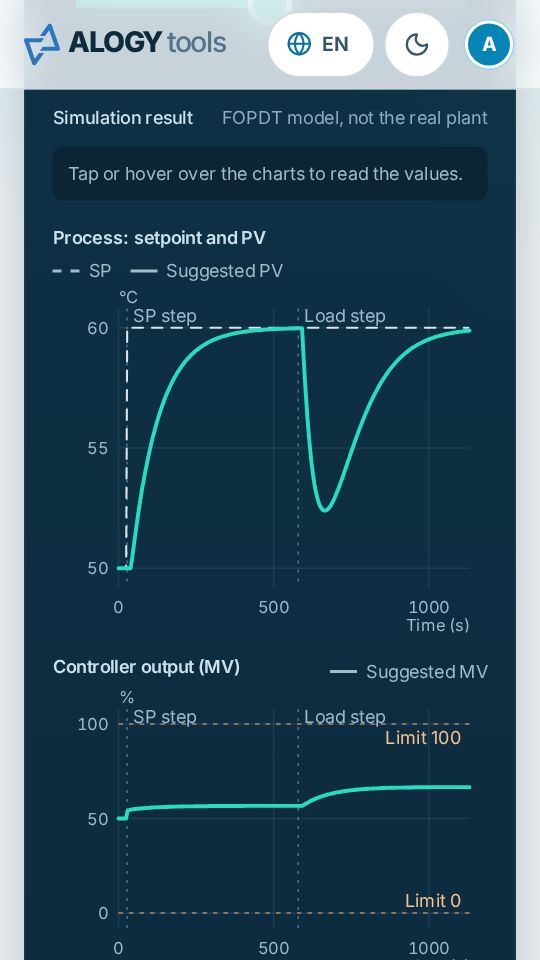
Loop tuning from a process model, with SP, PV and MV simulation.
4–20 mA loops, PT100, and cables and breakers for homes and industry based on NBR 5410.
Sensor current, resistance and voltage, with reference tables.
Sensors, signals, control and drives on the same bench.
Pulleys and reducers, fans and bearing fault frequencies.
Signal diagnosis, calibration sheets and field calculations with PDF.
DP transmitter range, PID tuning, pressure drop and sizing with visible assumptions.
mA, %, °C, Ω and mV, industrial units, normalized gas flow and ppm, with the formula in view.
Interactive diagrams, simulation and every result explained.
Questions
The monthly plan costs R$19.90 per month and the yearly plan R$149 per year, equivalent to R$12.42 per month. Both give access to the same tools.
Choose the plan, log in with your e-mail (we send you an access code) and pay by Pix or card on the Asaas page. Access is granted as soon as the payment is confirmed.
Yes. Six tools are free: the 4–20 mA calculator, residential cable sizing, the unit converter, RPM and pulleys, flow × velocity × diameter and PPM ↔ mg/m³. This page also has demos of the DP tank and of PID tuning. The other tools are part of the subscription.
Yes, whenever you like, in My account. Within 7 days of the first payment, you can withdraw and get the full amount back. After that, canceling stops the renewal and access continues until the end of the period already paid, with no refund.
No. The tools document calculations and data collection. They state what they do not do: they declare no conformity, uncertainty or traceability without the data from your procedure.
It is a starting point calculated from the process model, with simulation and values in the device convention. Applying it to the plant requires an authorised test and monitoring of the loop.
Calculations run on your device. Your work is saved in your browser, and the backup file stays with you. Subscribers can also keep work in their account, only when they click “Save to account”, to open it on another device.
Yes. Screens are designed for one hand and gloves: 44 px touch targets, a +/− key for negative values and text of at least 12 px on phones.
An AI chat explains well, but it can get a coefficient wrong, mix editions of a standard or miss a criterion, and its answer changes from one time to the next. Here, each calculation uses the tables of the cited standard, checks the main criteria together (for a cable: capacity, voltage drop, short circuit and shock protection), shows each tool’s limits and comes out as a PDF with the data used. The page “How we verify the calculations” shows official values side by side with the tools’ results.
Not once the device is prepared: on the tools dashboard, tap “Use offline” and the tools open without signal (subscription tools until the end of the access confirmed at the last connection). You can also install the app on your phone’s home screen.
Yes, with the subscription. In My account, fill in the report header with your name or your company’s, the contact and the logo: every PDF of the tools comes out with it. Without the header, the PDFs come out neutral, with no brand.
Portuguese, English and Spanish: screens, help and reports.
R$19.90 per month or R$149 per year.